The software intent graph
A living model of what your software must do.
Proof connects components, requirements, dependencies, hazards, issues, changes, defects, code, documentation, and evidence into one graph that stays synchronized with the software it describes.
Explore public Proof Open the live map ↗ seeded showcase branch; read the labels first
The model
One component, and everything Proof records about it.
Software intent, made explicit
Every system already has intent. It is scattered. Some of it is implied by the code, some of it is buried in a ticket system, and the rest is carried by the people who were in the room when the decision was made.
Proof writes it down as objects. A requirement states what the software must do, in one sentence a person approved. It names the evidence that keeps it true, and that evidence runs.
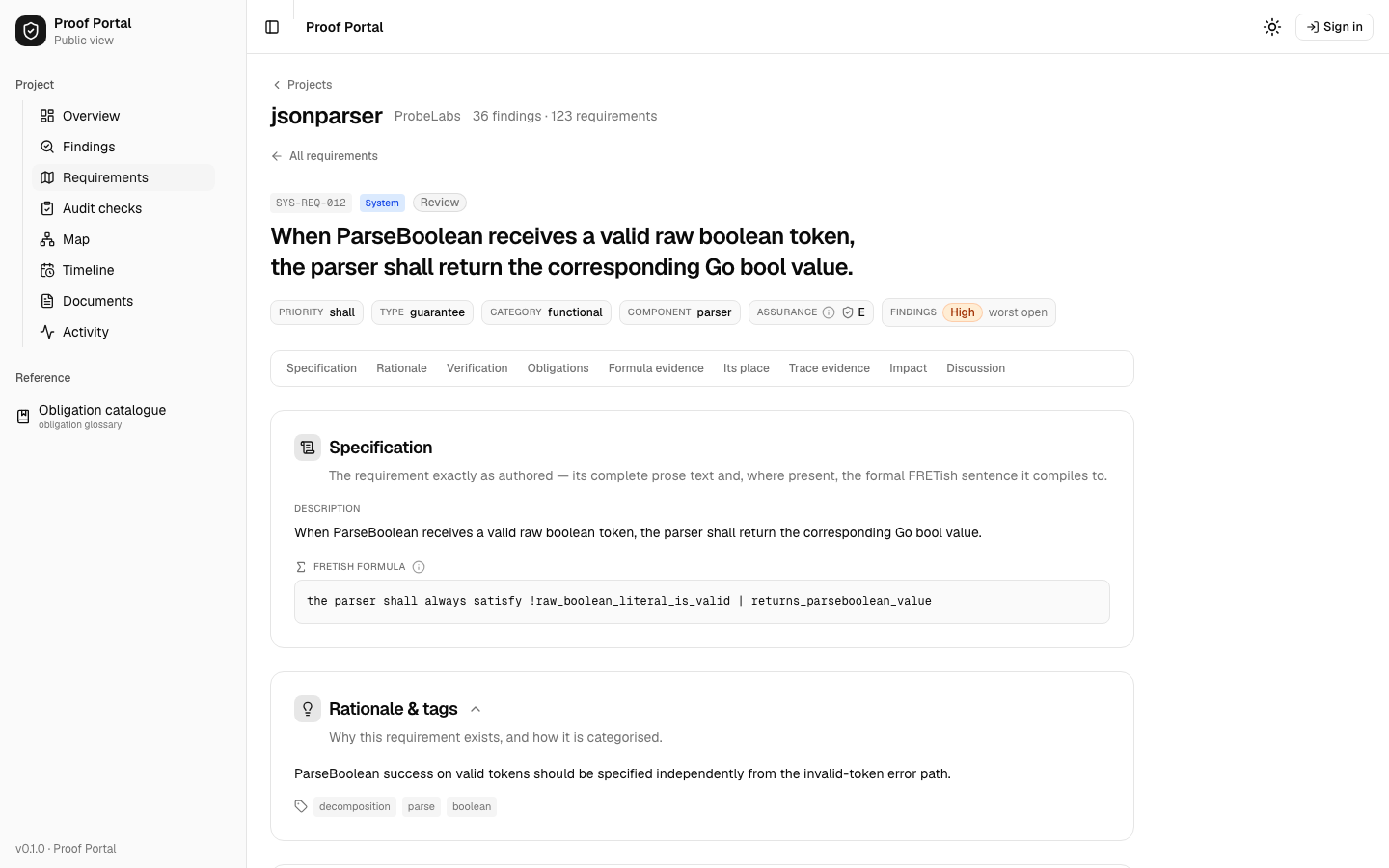
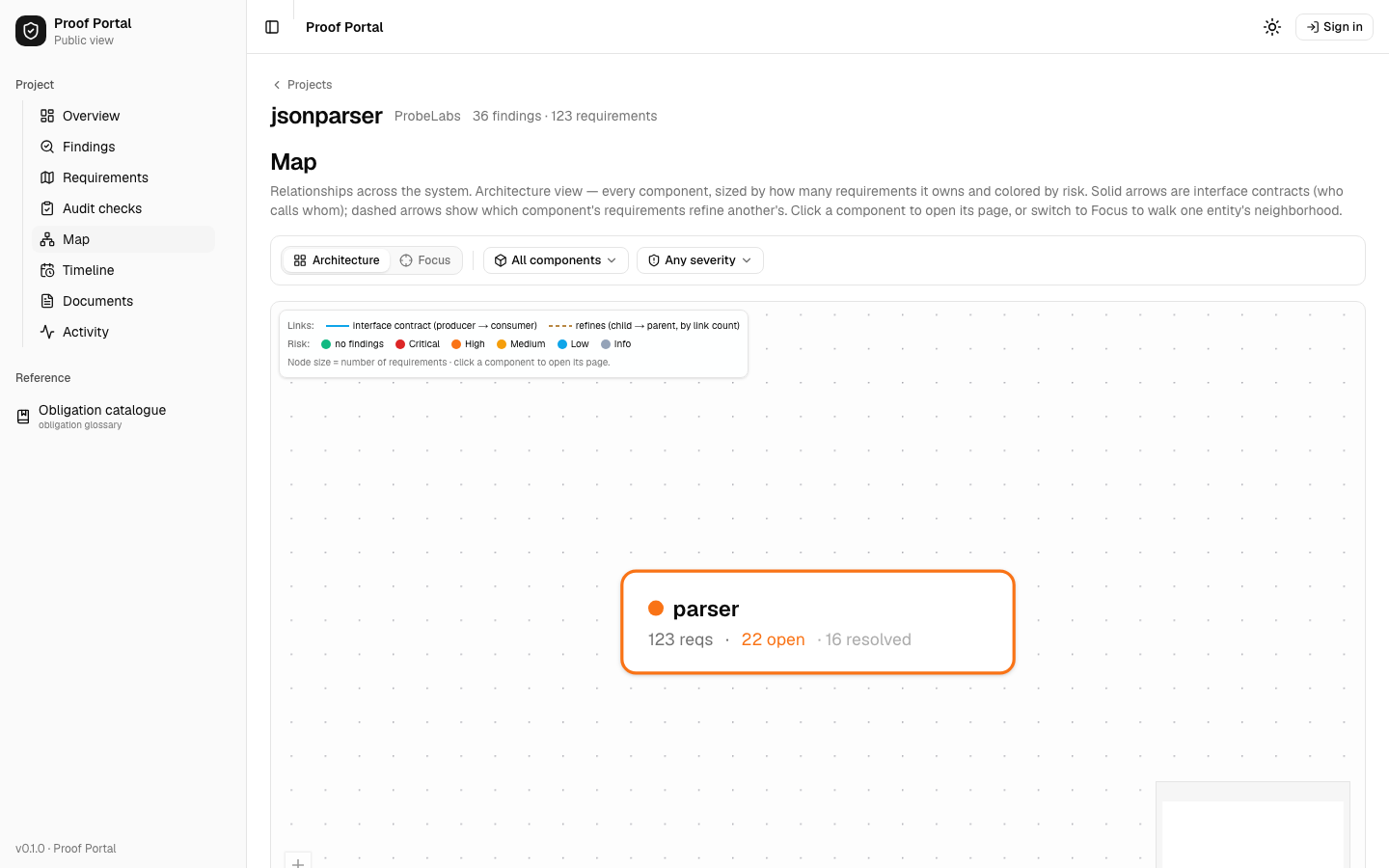
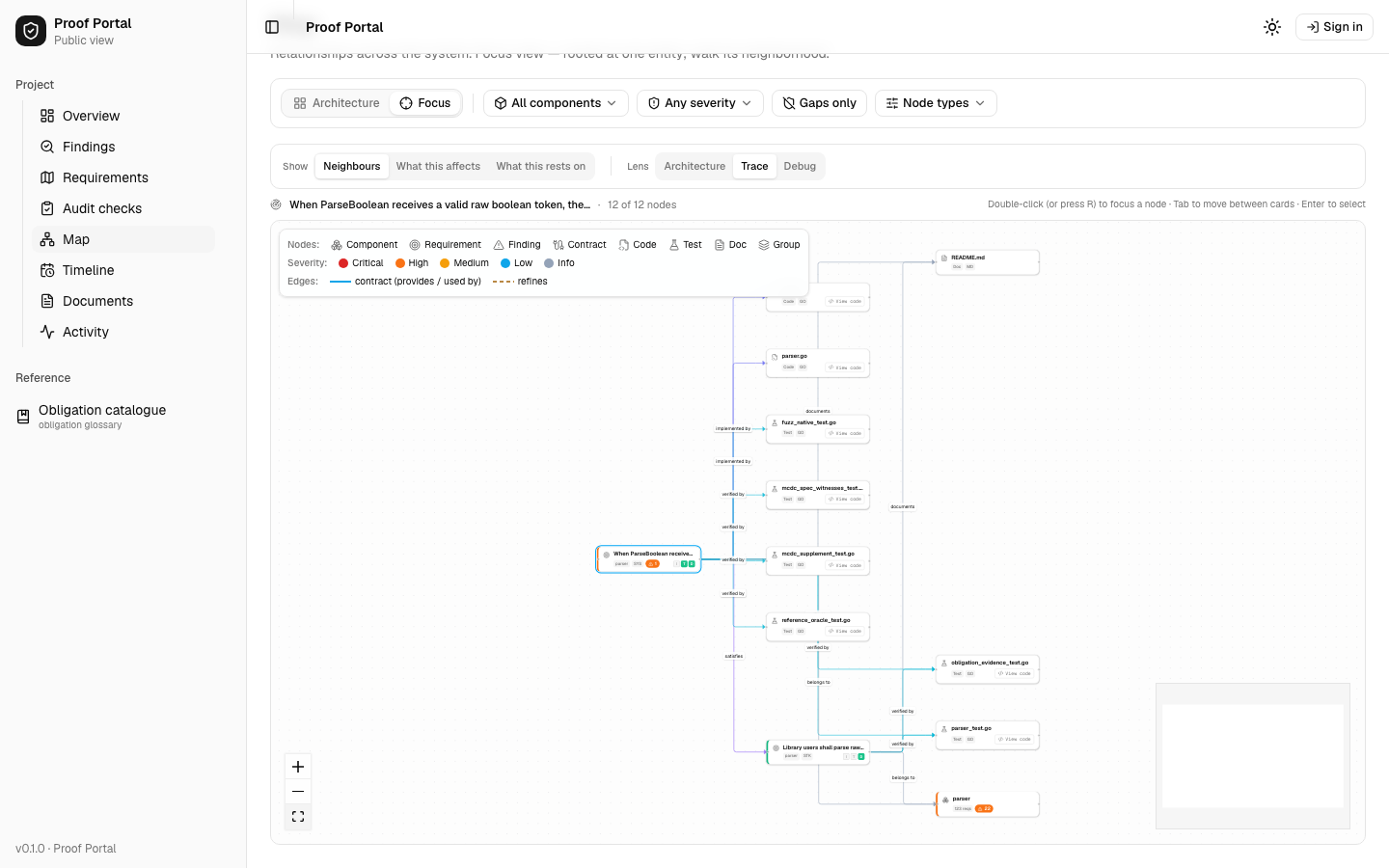
All four captures on this page are one run of the public portal for jsonparser, dated 3 August 2026. It is the showcase branch, proof-demo (on our probelabs/jsonparser fork, not on buger/jsonparser), which carries seeded demonstration issues next to the real history, so the finding counts inside these screens belong to that branch and not to the fixed register on master. Nothing in them is staged for this page. What the seeding means →
Components own responsibilities
A component is the unit of ownership. It is the part of the system a team can point at and answer for: a parser, a scheduler, a billing path.
Every requirement, every known issue and every change record belongs to exactly one component. Ownership is recorded, not inferred, so “who is responsible for this behavior” has an answer you can open.
Requirements depend on requirements
Requirements are not a flat list. A software requirement rests on a system requirement, which rests on something a stakeholder asked for. A requirement also carries hazards: the outcomes that must not happen when it fails.
Proof does not record what calls what. It records what depends on what being true. Two functions that never meet in a stack trace can still rest on the same promise, and the graph knows it.
Sources·specs/stakeholder/requirements/·specs/system/requirements/
The same pair, step by step →Blast radius, on a worked example →
Every change carries its evidence
A commit says what text moved. It does not say why the behavior moved, or what still holds afterwards.
In Proof a change is a record. Features, behavior changes, refactors and fixes are one object with a different kind, and each one arrives with the evidence that made the result acceptable.
What a change record carries
- 01why the behavior changed
- 02which component owns it
- 03which requirements were introduced, changed, or affected
- 04the implementation diff
- 05documentation changes
- 06blast radius
- 07tests and other evidence
- 08review and approval
- 09final verification state
Three words this page uses precisely
-
known issue
A problem that is not resolved yet. It carries the violated requirement, the affected component, and a reproducer that runs.
-
defect record
The evidence-bearing history that exists after a fix is verified. It keeps the originating issue, the original reproducer, the fixing change, the root cause, and permanent regression evidence.
-
change record
The shared model across features and fixes. Every kind of change uses it, so the history of a component reads as one sequence.
A passing reproducer proves the known instance is gone. The wider class stays open until broader evidence arrives, and Proof keeps the two apart.
The graph invalidates itself
Software knowledge becomes dangerous when it silently goes stale. When code, a requirement or a document changes, Proof identifies the relationships and the evidence that may no longer be current.
Stale is not false. Proof does not declare the requirement wrong. It withdraws yesterday’s confidence, and it names the obligations that have to be reviewed or rerun before the claim stands again.
-
✓VERIFIED
The evidence ran against this version of the code and this version of the graph, and it passed.
-
?EVIDENCE STALE
Something it rests on moved. The result is not withdrawn as wrong, it is withdrawn as unproven, and it has to be earned again.
-
✗VIOLATED
The evidence ran and it failed. A known issue is attached, with the reproducer that shows it.
Nobody has to remember which document went out of date. The graph carries the dependency, so it can raise its own hand.
Humans and agents use the same model
There is no human edition and no machine edition. A person and a coding agent open the same objects, with the same relationships and the same evidence attached to them.
Only the shape of the answer differs. A person reads a requirement. An agent receives the same requirement as structured context before it writes a line of code.
A person opens
- the requirement, and what it rests on
- the hazards it carries
- the code and documentation that implement it
- the evidence that keeps it verified
- every change that has touched it
An agent receives
- the requirements in scope for this edit
- the blast radius of the edit
- the obligations that must pass before the work is complete
- the reproducer, when a known issue already exists
- the same change history, as structured context
Agents reach the graph over MCP today, and that interface is expected to change, with the permissions you grant. What an agent writes is a candidate. It is not approved intent until a person approves it.
The graph lives with the customer
The graph is not a dashboard you rent. It lands in your repository as plain files, under your licence, versioned with the code it describes.
The evidence is executable. Tests, properties and reproducers run on your runners, with your secrets, and the gate that blocks a bad merge is a step in your CI.
You keep them if we stop. Nothing in the graph needs us in the room to run.
Install it on one component
You do not install Proof across a company. You install it on one component that matters, with the engineers who own it.
One component is enough to be useful, because a component is a complete unit of intent. The second one costs less than the first, because the graph it joins already exists.
What the first installation leaves behind
- approved requirements
- intent graph
- hazard analysis
- executable findings
- change and defect evidence
- agent access
- CI gate
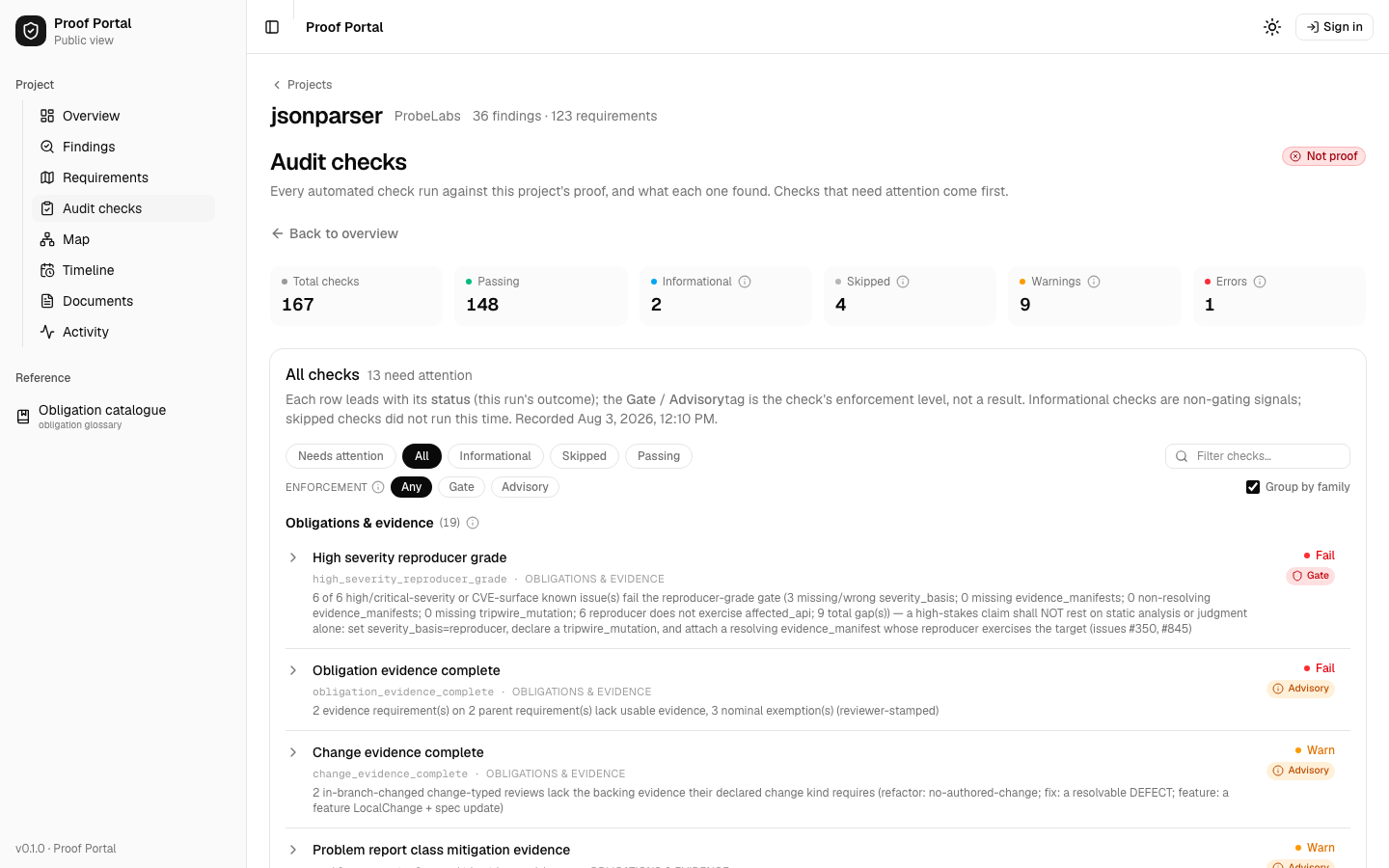
The Continuous Correctness Audit is how the first component gets installed. Proof is what stays afterwards.